Every community on Whistlr starts the same way: a handful of people who care about the same thing. Growing past that handful means reaching people who don't know you exist yet, and the best place on Whistlr to reach them is the discovery feed. The Whistlr discovery feed is where people go when they want to find something new: live streams happening right now, Minis worth watching, the hashtags everyone's talking about, and the communities growing fastest. This guide explains what the discovery feed is, how communities, creators, and hosts show up there, and a step-by-step playbook for using it to grow a SubCircuit, a Haven, a live stream audience, or a following of your own, without gimmicks and without paying for reach.
If you've read our deep dive on the Search feed, some of this will sound familiar. The screen you land on when you tap search is no longer a blank page. It's a living discovery feed, and it's where Whistlr's discovery experience now comes together. That article explained how individual creators get found in search. This one zooms out to the question we hear most from community builders: how do I use discovery to bring new members into the space I've built?
What Is the Whistlr Discovery Feed?
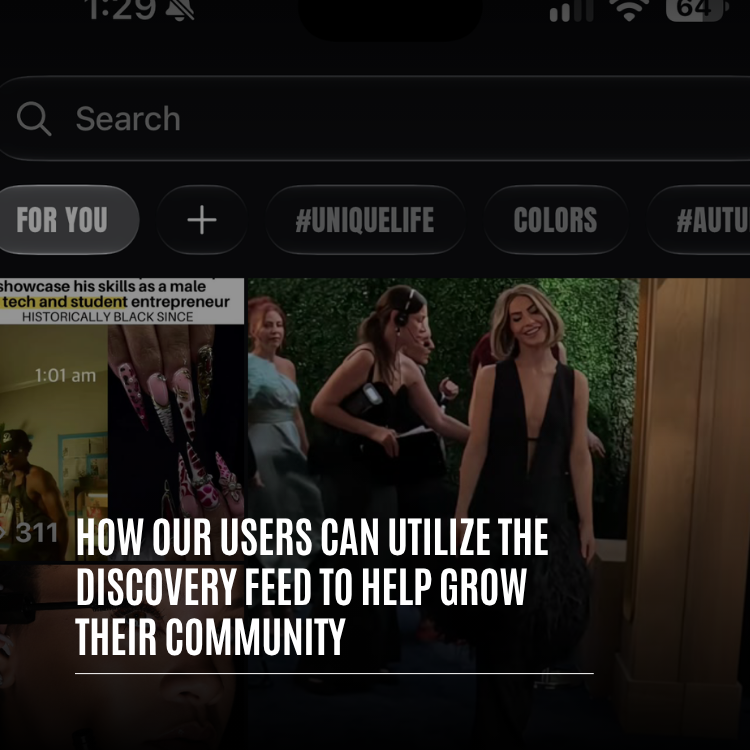
The Whistlr discovery feed is the browsable feed you see when you open search, before you type anything. It's built for people in a "show me something" mood, and it pulls from across the whole platform, not just the accounts you already follow. Scroll it from top to bottom and you'll move through a series of sections, each one a different doorway into Whistlr.
- A featured carousel and hashtag ticker: The top of the feed leads with featured moments and a running strip of hashtags, so you can jump into a theme with one tap.
- Live now: Streams and live rooms happening right now, with a "Watch all" option when you want to see everything that's on.
- Minis: A band of short videos with a quick way into the full Minis experience.
- What everyone's talking about: A ranked list of the top ten hashtags on Whistlr right now, each one showing how many posts it has.
- Trending posts: The posts catching on across the community.
- Join the conversation: The communities growing fastest right now, plus the threads people can't stop arguing about, with a shortcut to all communities.
- Music from Waves: Playlists and new releases, with a quick way to open Waves.
- News and featured posts: Freshly published stories, featured posts, and more stories to read.
- Keep exploring: When you reach the bottom of the editorial sections, an endless feed of posts and Minis keeps going for as long as you want to scroll.
The search bar stays at the top the whole time. Tap it and you'll see your recent searches, hashtags under "You may like" with a Refresh option to see more, and trends. Start typing and suggestions appear instantly for people, hashtags, songs, posts, and communities. Search results are organized into categories like Trending, Minis, Waves, Communities, Hashtags, and Flow for live streams.
"Discovery is where a community gets its second chance to be found. Your friends and followers are the first audience, and that matters a lot on Whistlr. But every community eventually needs strangers who become regulars. The discovery feed is built to make that introduction, and to give a small, active community a real shot at it, not just the biggest accounts on the platform."
— Renata Osei, VP of Product, ETAPX
Why the Discovery Feed Is the Best Place to Grow a Community
Most of Whistlr is built around people you already know. The home feed puts your friends first, and friend-first discovery means a recommendation from someone you trust carries more weight than a stranger's viral post. That's what makes Whistlr feel personal. It also means that if you want your community to grow beyond your existing network, you need a surface designed for meeting new people. The discovery feed is that surface.
The People There Are Looking for Something
Someone who opens the discovery feed is in an exploring mindset. They didn't land there by accident. They tapped search because they want to find something worth their time. That's a very different audience from someone half-scrolling a feed of people they already follow. When your community, stream, or post appears in front of someone in that mood, the odds that they tap, look around, and join are much higher.
Communities Have Their Own Section
The discovery feed doesn't treat communities as an afterthought. The "Join the conversation" section exists specifically to show the communities growing fastest right now, alongside the threads driving the most discussion. That means growth feeds on itself: a SubCircuit that's picking up momentum gets a spot in front of people who are actively exploring, which brings in more members, which keeps the momentum going.
It Rewards Activity, Not Just Size
The sections that matter most for community builders are built around what's happening now: communities growing fastest, threads people are arguing about, hashtags gaining posts, streams that are live this minute. None of those require a huge following. They require an active one. A new community that gets its members talking can show up next to communities many times its size.
How Your Community Shows Up in the Discovery Feed
Different kinds of communities reach the discovery feed through different doors. Here's how each section works for community builders, and what you can do to show up there.
"Join the Conversation": Communities and Their Best Threads
This section shows community cards with their banners, alongside the threads drawing the most discussion. For SubCircuit owners, it's the single most direct path from the discovery feed into your community. Two things help you here. First, your banner and description: the community card leads with your banner, so a SubCircuit with a clear, intentional banner looks like a place worth visiting, while a placeholder looks abandoned. Second, your threads: a thread that sparks real back-and-forth can be the thing that pulls a curious explorer into your community, so post the kinds of questions and takes your members love to discuss.
Hashtags: The Shared Language of Discovery
Hashtags show up all over the discovery feed: in the ticker at the top, in the ranked "What everyone's talking about" list, in "You may like" when someone taps search, and in the Hashtags tab of search results. For a community, a consistent hashtag works like a flag. When your members use the same tag on their posts, Minis, and threads, that tag builds up a body of posts, becomes easier to find, and becomes a doorway back to your community. Pick a tag that's short, specific, and easy to remember, and use it every time.
Live Now: Your Community, in Real Time
Live streams and live rooms appear in the discovery feed while they're happening, and Flow live streams have their own tab in search results. For a community, going live is one of the strongest growth moves available. A community watch party, a weekly Q&A, a live audio room where members talk through a topic, or a stream from an event your community is at can all show up in front of people looking for something to watch. Someone who drops in on a lively room with your community in the chat gets a much better first impression than they'd get from a static page.
Minis and Trending Posts: Your Best Content as an Invitation
Short videos and trending posts are often how people first meet a community without knowing it. A great Mini that shows what your community is about, a recap of an event, a highlight from a stream, or a funny moment from a thread, can travel far beyond your members. Whistlr's discovery surfaces increasingly pay attention to what people actually watch through and come back to, the same philosophy behind the rebuilt Trending tab. Content that earns a full watch holds up much better than content built only to grab the first second.
Search Results: Being Found on Purpose
Not everyone browses. Some people type exactly what they're looking for. When someone searches a topic, the Communities tab shows related communities, and suggestions surface communities as they type. That's why the words you use matter. A community whose name, handle, and description clearly say what it's about is much easier for search to match to the right people.
"Our film photography SubCircuit sat at about forty members for months. We started running a weekly thread where everyone posts their best roll, gave it its own hashtag, and went live once a month to talk through shots. A few weeks later we showed up in the communities section on the discovery feed, and that week alone more people joined than in the whole time before. Most of them are still posting."
— Imani, SubCircuit owner on Whistlr
A Step-by-Step Playbook for Growing Your Community With Discovery
Growth through discovery isn't about tricks. It's about making your community easy to understand, easy to find, and worth staying in. Here's a playbook that works for SubCircuits, Havens, and creator communities alike.
- Make your front door clear. Before you try to bring anyone in, make sure your community's name, handle, banner, and description say exactly who it's for and what happens there. Someone arriving from the discovery feed will decide in a few seconds whether to stay.
- Seed it with real activity. Post the threads you wish already existed and invite a small founding group who'll actually participate. The communities section rewards communities that are growing and talking, so give it something to show.
- Choose a signature hashtag. Pick one short, specific tag and ask your members to use it on related posts, Minis, and threads. Over time it becomes a reliable path back to your community.
- Start a recurring thread. A weekly prompt, challenge, or showcase gives members a reason to post and creates the kind of discussion that gets noticed.
- Go live on a rhythm. Host a regular stream or live audio room for your community. Every live session is another chance to appear in the discovery feed while people are looking for something to watch.
- Turn your best moments into Minis. Clip highlights from streams, recap events, and share the best of your threads as short videos. Mention your community so viewers know where to find more.
- Welcome every newcomer. When someone arrives from discovery and posts for the first time, reply. A fast, friendly response is the difference between a one-time visitor and a regular.
- Check what's working. Use Creator Insights in Creator Studio to see where your audience comes from, including search, and adjust your titles, tags, and topics based on what's bringing people in.
Turning Discovery Visitors Into Members
Getting found is only half the job. The discovery feed can bring people to your door, but your community has to make them want to stay. Here's what turns a curious visitor into a regular.
Show Them What Happens Here
When someone opens your community for the first time, the top of the feed is your pitch. Keep a pinned welcome thread or post that explains what the community is about, how to join in, and what's coming up. A newcomer should be able to figure out how to participate in under a minute.
Keep the Rules Short
Clear rules help newcomers feel safe joining a community of strangers. Four to eight short rules that people will actually read do more than a long list nobody opens. They also tell visitors that the community is looked after, which matters a lot to someone deciding whether to join.
Give People an Easy First Step
The hardest post in any community is the first one. Make it easy with low-pressure prompts: introduce yourself, share your favorite, post a photo of your setup. Communities that give newcomers an easy first step see far more of them stick around.
Connect Discovery to Your Other Spaces
Your community probably lives in more than one place: a SubCircuit for threads, a Haven pinned to the spot where you meet up, a live stream where everyone hangs out, and your own profile. Make it easy for someone who found one of them to find the rest. Mention your Haven in your SubCircuit, share your SubCircuit on your stream, and keep your profile description clear about where your community lives.
"We designed the discovery feed to make introductions. What happens after that is up to the community, and the ones that grow are always the ones that make a newcomer feel expected. A clear welcome, a friendly reply to a first post, a reason to come back next week. That's what turns a tap from the discovery feed into a member for years."
— AJ, Founder & CEO, ETAPX
Discovery Feed Strategies for Different Kinds of Communities
The playbook applies broadly, but different communities lean on different parts of the discovery feed.
- SubCircuits: Focus on the "Join the conversation" section and search results. A strong banner, lively threads, and steady growth are what put a SubCircuit in front of explorers.
- Havens: Pair the discovery feed with Nearby. Share Minis and posts from your Haven's location, use a hashtag tied to the place, and go live from the spot so people find both the stream and the Haven.
- Creators building a fan community: Lean on Live now, Minis, and trending posts. Your content is the doorway, and your community is where fans go to get closer.
- Local businesses: Use hashtags and Minis that show your space, your products, and your regulars. The discovery feed helps people who don't know you yet see what makes your spot worth a visit.
- Music communities: Use Waves and live rooms. Shared playlists and listening sessions give music lovers a way into your community through the soundtrack.
How the Discovery Feed Fits With Trending, Highlights, and Your Home Feed
Whistlr has several places to find content, and each one plays a different role in how a community grows.
- Home feed: Friends first, then the wider world. This is where your existing members and followers see your community's activity.
- Trending: What's catching fire across Whistlr right now, weighted toward content people actually watch through and come back to.
- Highlights: A curated stop for standout clips and peak moments when someone has only a few minutes.
- Discovery feed: The place built for finding what's new to you, including the communities growing fastest, the hashtags everyone's using, and what's live right now.
A healthy community shows up in all of them. Your members see you in their home feeds. Your best content has a chance at Trending and Highlights. And the discovery feed is where people who've never heard of you get their first look.
Privacy and Control in Discovery
Growing a community through discovery means being visible, and that's always your choice on Whistlr. The discovery feed surfaces content and communities that are already public. If your profile is public, your posts can appear in discovery. If your profile is private, only your friends see your posts and they don't appear in public discovery. Private communities stay private, and your privacy settings keep shaping how your account and content appear to others.
For community builders, that means you decide how discoverable your space is. A public SubCircuit or Haven can be found by anyone exploring. A private one stays a closed space for the people you invite. Many communities use both: a public space for growth and a private one for their closest regulars.
Tips for Growing Your Community With the Discovery Feed
- Be specific, not vague: A focused community with a clear description is easier to find and easier to join than one that tries to be about everything.
- Polish your banner: Community cards in the discovery feed lead with your banner. Make it look intentional.
- Use one hashtag consistently: A shared tag turns your members' posts into a trail back to your community.
- Start conversations people want to join: Lively threads are what get communities noticed in "Join the conversation."
- Go live regularly: Every live session is another chance to appear in front of people looking for something to watch.
- Make Minis that invite people in: Show what your community is like, and tell viewers where to find it.
- Reply to first posts fast: The first response a newcomer gets shapes whether they come back.
- Measure and adjust: Check Creator Insights to see whether discovery and search are bringing people in, and keep refining.
Frequently Asked Questions
What is the Whistlr discovery feed?
The Whistlr discovery feed is the browsable feed you see when you open search, before typing anything. It shows live streams happening now, Minis, the top hashtags, trending posts, the communities growing fastest, music from Waves, news, and an endless "Keep exploring" feed, with the search bar always available at the top.
How can I get my community featured in the discovery feed?
Keep your community active and growing. The "Join the conversation" section shows the communities growing fastest right now, along with the threads drawing the most discussion. A clear banner and description, lively threads, a consistent hashtag, and regular live sessions all make your community more likely to show up and more likely to convert visitors into members.
Do I need a big following to grow a community through discovery?
No. The sections that matter most for communities are built around current activity, like communities growing fastest, active threads, hashtags gaining posts, and streams that are live right now. A small community with engaged members can appear next to much larger ones.
How do hashtags help my community get discovered?
Hashtags appear throughout the discovery feed, including the ticker at the top, the ranked "What everyone's talking about" list, the "You may like" suggestions in search, and the Hashtags tab of search results. When your members use one consistent hashtag, it builds up posts and becomes a path back to your community.
Can live streams help grow my community?
Yes. Live streams and live rooms appear in the discovery feed while they're happening, and Flow live streams have their own tab in search results. Regular community streams, watch parties, and live audio rooms give people looking for something to watch a lively first look at your community.
Will my private community or private posts show up in the discovery feed?
No. The discovery feed only surfaces public content and communities. If your profile is private, your posts don't appear in public discovery, and private communities stay visible only to the people allowed in.
How do I know if the discovery feed is bringing people to my community?
Creator Insights in Creator Studio shows where your audience comes from, including search, profiles, feeds, reposts, and recommendations. Watch how those sources shift as you refine your banner, hashtags, threads, and live schedule.
What's the difference between the discovery feed and Trending?
Trending shows what's catching fire across all of Whistlr, weighted toward content people watch through and return to. The discovery feed is built for exploring, and it pulls together live streams, Minis, hashtags, trending posts, the fastest-growing communities, music, and news in one place, with search right at the top.
The people scrolling the discovery feed are looking for somewhere to belong. Make your community easy to find, easy to understand, and easy to join, and the next member who taps in from discovery might stay for years. Open search, see where your community fits, and start building.