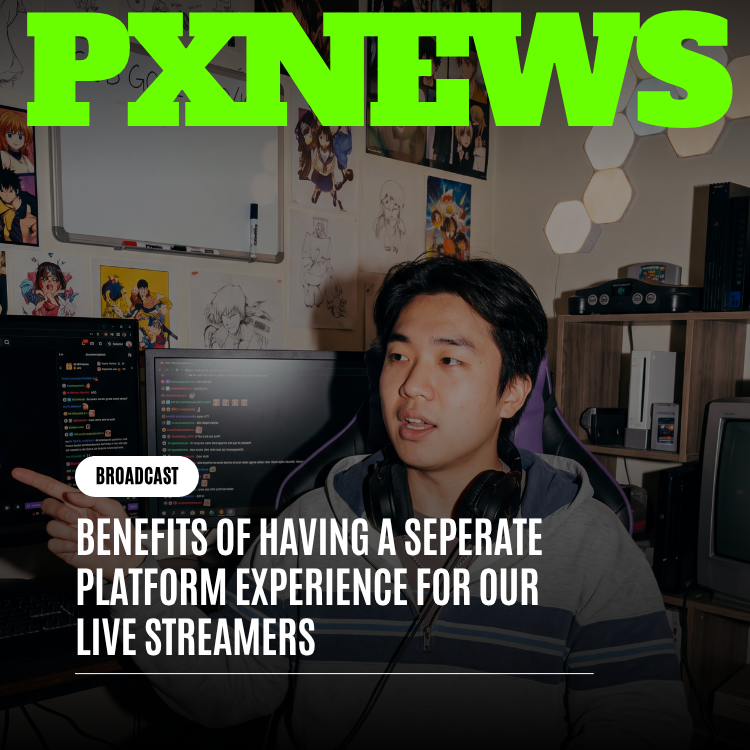
The moment a broadcaster taps "Go Live," everything about what they need from an app should change — and on Whistlr, it does. Live streamers get a separate platform experience the instant they're on air: a dedicated broadcaster view built specifically for the singular job of running a great stream, not a stripped-down version of the regular feed with a chat box taped to the side. This piece is about why that distinction matters more than it sounds like it should, what a purpose-built streaming interface actually gives a broadcaster that a bolted-on live player never could, and how treating live broadcasting as its own dedicated experience — rather than a video window inside the same old social scroll — changes both the quality of the stream and the state of mind of the person running it. If you've ever felt scattered while trying to broadcast, chat, watch your stats, and dodge the ordinary chaos of a social feed all at once, this is the problem Whistlr's separate platform experience for live streamers was built to solve.
The Bolt-On Problem: Why Most Platforms Get Live Streaming Wrong
Walk through almost any major social app's live feature and you'll notice the same pattern: live video gets treated as an addition, not a foundation. A team ships the core feed, the core nav, the core profile pages — the entire architecture of a browsing experience — and then, later, someone bolts a live player onto it. The player sits inside the same navigation shell. The same notification badges keep firing in the corner. The same "For You" recommendations keep needling for attention in a tab one swipe away. A chat panel gets wedged into whatever space is left over, usually a narrow column that scrolls too fast to actually read while you're also trying to talk, perform, and watch a clock.
None of that is malicious — it's just what happens when live video is treated as a feature you add to an existing product instead of an experience you design from scratch. The trouble is that broadcasting and browsing are not the same activity wearing different clothes. Browsing is passive, exploratory, and forgiving of interruption. Broadcasting is active, high-stakes, and deeply intolerant of interruption — a streamer mid-sentence who gets distracted by an unrelated notification doesn't just lose a beat, they can lose the room. A streaming interface inherited from a browsing app is, structurally, the wrong tool for the job, no matter how good the video quality is underneath it.
This is the gap Whistlr set out to close with a genuinely separate platform experience for live streamers. Not a better chat sidebar. Not a slightly reorganized version of the main app. An entirely distinct broadcaster experience that exists for exactly one purpose: giving a live streamer everything they need to run a great stream, and nothing that gets in the way of it.
What "Separate Platform Experience" Actually Means on Whistlr
When a Whistlr streamer goes live, the app doesn't just open a camera and start recording over the usual home screen. It shifts into a distinct broadcaster mode — a dedicated live streaming interface built around the specific rhythm of running a broadcast rather than scrolling one. The regular feed disappears. The regular navigation bar disappears. The endless stream of unrelated notifications, trending posts, and algorithmic suggestions that define ordinary app browsing steps out of the way entirely, replaced by a focused command surface built for exactly one job.
A Purpose-Built Surface, Not a Video Player With Extras
The distinction matters because there's a meaningful difference between "a video player with a chat sidebar" and "a dedicated space to broadcast from." The former treats live video as content sitting inside an app. The latter treats the entire screen — every pixel of it — as belonging to the act of broadcasting. On Whistlr's dedicated streamer view, chat isn't a cramped afterthought competing for space with unrelated UI chrome; it's given room to breathe and actually be readable in the middle of a fast-moving stream. Viewer reactions aren't buried in a notification tray; they surface directly in the broadcaster's line of sight, timed to the moment they happened. WTC Gems arriving mid-stream aren't a background event a streamer has to go check on later — they show up where the streamer is already looking, becoming part of the live moment rather than a statistic to review after the fact.
Everything a Streamer Needs, Nothing They Don't
Just as important as what the separate platform experience includes is what it deliberately leaves out. There's no "For You" feed pulling focus mid-broadcast. There's no unrelated post from someone you follow surfacing at the exact wrong moment. There's no algorithmic nudge trying to route attention somewhere else, because the entire premise of a dedicated broadcaster mode is that attention is the streamer's most valuable resource during a live moment, and the interface's job is to protect it rather than compete for it.
- A focused chat view: Messages render large enough and fast enough to actually read and respond to mid-broadcast, without competing for space against unrelated app chrome.
- Live reaction visibility: Viewer reactions surface in the streamer's direct line of sight in the moment they happen, not buried in a tray to check later.
- Real-time Gems tracking: WTC Gems arriving during the stream appear where the broadcaster is already looking, turning support into a visible, shared moment instead of a number to review afterward.
- Stream health at a glance: Broadcast status is visible without hunting through menus, so a streamer always knows their stream is actually running well.
- Zero feed intrusion: No trending posts, no algorithmic recommendations, no unrelated notifications competing for attention during the broadcast window.
- A dedicated exit, not an accidental one: Ending a stream is a deliberate action inside broadcaster mode, not something a stray tap on ordinary nav elements could trigger by mistake.
Put together, this is what "separate platform experience" really means in practice: not a cosmetic skin over the same app, but a fundamentally different mode built for a fundamentally different task. Whistlr streamers aren't using a slightly rearranged version of the app they browse in every day — they're stepping into a dedicated broadcaster environment the moment they choose to go live, and stepping back out of it the moment the stream ends.
The Psychology of Having a Dedicated Space to Broadcast From
There's a practical case for a separate broadcasting interface, and there's a psychological one, and the second matters just as much as the first. Anyone who has performed in front of an audience — on a stage, in a meeting, on a call, in front of a camera — knows that the physical or digital space you're performing in shapes your state of mind before a single word gets said. A cluttered environment produces a cluttered headspace. A focused environment makes it easier to actually be present.
Live streaming is performance, whether the content is gaming, a live shopping drop, a WildDraw battle, or just hanging out and talking to a community. And performance requires a kind of mental compartmentalization: the streamer needs to be "on," fully inhabiting the broadcast, for however long the stream runs. Every reminder of the outside world — a notification badge, a glimpse of an unrelated feed, the visual noise of an app designed for browsing rather than broadcasting — chips away at that compartmentalization. It's not usually one big interruption that breaks a streamer's focus; it's the accumulation of a dozen small ones, each pulling a sliver of attention away from the room they're trying to hold.
A dedicated broadcasting space works the opposite way. Stepping into a mode built only for going live sends a clear signal, both to the interface and to the streamer's own head: this is a different kind of time now. It's the digital equivalent of walking into a studio instead of setting up a camera in the corner of a room where the TV is still on. The environment itself does part of the psychological work of getting — and staying — locked in.
"I didn't realize how much mental energy I was burning just tuning out the rest of the app until I didn't have to anymore. When I go live now, everything on my screen is about the stream — my chat, my reactions, my Gems coming in. There's nothing pulling my eyes away to check what else is happening. I actually feel calmer on stream now, not more stressed, because the interface isn't fighting me for attention anymore."
— Marisol Vega, Whistlr Creator
From Feed to Broadcast: How the Mode Shift Actually Works
One of the more thoughtful details of Whistlr's separate platform experience for live streamers is how the transition itself is handled. Going live isn't a jarring context switch that leaves a streamer disoriented for the first thirty seconds of their own broadcast — it's a deliberate, guided shift from "browsing Whistlr" to "broadcasting on Whistlr" that gives the streamer a moment to settle before viewers start arriving.
Tapping into broadcaster mode reorganizes the entire screen around the act of going live: camera preview front and center, stream details ready to confirm, and the same dedicated chat, reaction, and Gems surfaces that will carry through the whole broadcast already in place before the first viewer joins. There's no fumbling to find the right controls once people are already watching. By the time a stream actually goes live, the streamer has already been operating inside the dedicated broadcaster experience for a few moments — which means the interface they're using at second one is exactly the interface they'll be using at minute sixty, with nothing to relearn or reconfigure mid-stream.
The reverse transition matters too. Ending a stream inside the dedicated broadcaster experience is an intentional act — a clear, deliberate step rather than something that could happen by accident from a stray tap on ordinary navigation. That might sound like a small detail, but for anyone who has ever watched a streamer accidentally knock themselves offline mid-sentence on a platform where "live" and "browsing" share the same buttons and gestures, it's the kind of detail that actually earns a streamer's trust in the tool they're using.
Why a Distraction-Free Broadcaster Mode Improves the Quality of the Stream Itself
The benefits of a separate platform experience for live streamers aren't only about how a streamer feels — they show up in the actual quality of what viewers experience too. A streamer who isn't mentally splitting attention between broadcasting and navigating a busy, general-purpose app interface is a streamer who can devote more of themselves to the thing viewers actually showed up for: the content, the conversation, the moment.
Faster, More Natural Chat Engagement
When chat is front and center in a dedicated broadcaster view rather than squeezed into a corner of a general app layout, streamers read and respond to messages faster and more naturally. That responsiveness compounds — a stream where the broadcaster clearly sees and reacts to chat in real time feels alive in a way a stream with a five-message delay never will, and viewers who feel seen tend to stick around, chat more, and send more WTC Gems.
Reactions and Gems That Land as Shared Moments
Because viewer reactions and incoming Gems surface directly inside the dedicated streamer view rather than requiring a separate check-in, they become part of the live moment instead of something discovered after the fact. A gem that shows up on screen exactly when it's sent, right where the streamer is already looking, turns into a genuine shared beat between broadcaster and audience — the kind of moment that makes a viewer want to send the next one, and makes a streamer want to acknowledge it out loud, which only deepens the connection further.
Fewer Broken Moments, More Sustained Momentum
Live content lives and dies on momentum. A streamer who has to glance away to navigate unrelated app chrome, or who gets pulled out of the moment by an unrelated notification, breaks the thread they've been building with their audience — and rebuilding that thread takes real effort. A dedicated broadcasting experience, free of that clutter, means fewer broken moments and longer stretches of uninterrupted, high-energy engagement, which is exactly the kind of stream that keeps viewers watching, participating, and coming back for the next one.
"We kept hearing the same thing from creators, in different words: broadcasting on Whistlr should not feel like using Whistlr. It should feel like stepping into your own space to do the thing you're best at. That's the whole idea behind building a genuinely separate platform experience for our live streamers instead of just dropping a live player into the same feed everyone scrolls through. A streamer's attention is the most valuable thing they bring to a broadcast, and our job is to protect it, not compete with it."
— AJ, Founder & CEO, ETAPX
Built for Every Kind of Broadcaster, Not Just One Format
A dedicated streaming interface only earns its place if it actually holds up across the very different things Whistlr streamers use it for. A creator running a fast-paced WildDraw battle needs live reaction visibility and real-time tallies to feel every swing of momentum as it happens. A creator hosting a Live Shopping session needs Gems and viewer engagement front and center so they can read the room and time a drop perfectly. A creator who's simply hanging out, talking, and building community needs chat to feel close and immediate, not distant and delayed. The dedicated broadcaster experience isn't tuned narrowly for one of these formats at the expense of the others — it's built as a flexible, focused surface general enough to serve all of them, while staying just as free of distraction no matter which one a streamer is running.
That flexibility matters because Whistlr streamers rarely do just one thing. The same creator might run a WildDraw battle on Monday, a Live Shopping event on Wednesday, and an open hangout on Friday — and in every case, they should be dropping into the same dependable, focused broadcaster mode, learning it once and trusting it every time after that. Consistency of experience, format after format, is part of what makes a dedicated streaming surface actually usable in the real, varied rhythm of a creator's week rather than just being impressive in a single demo scenario.
A Dedicated Experience Is a Statement About Who Streaming Is For
There's a broader point buried in all of this that's worth pulling out explicitly: building a genuinely separate platform experience for live streamers is a statement about how seriously a platform takes the people doing the broadcasting. It would have been easier, and cheaper, to simply drop a live video player into Whistlr's existing feed and call it a live feature. That's what a lot of platforms do, and it's exactly why so much live content on so many apps feels like an afterthought bolted onto something else.
Choosing instead to design a dedicated broadcaster mode — one with its own focused chat view, its own real-time reaction and Gems surfaces, its own deliberate entry and exit points, and its own freedom from the noise of the regular feed — is a choice to treat live streamers as broadcasters first, not just as users of a social app who happen to be holding a camera. That distinction shapes everything downstream: the quality of the streams themselves, the confidence streamers feel while running them, and ultimately the strength of the live community that forms around them on Whistlr.
It also reflects something ETAPX has said plainly about where broadcasting tools are headed: the interface a streamer uses while live shouldn't be an afterthought squeezed in around everything else the app does. It should be engineered with the same intention as any other core part of the platform — because for the person on the other side of that camera, in that moment, it isn't a side feature. It's the whole experience.
Frequently Asked Questions
What does "separate platform experience" actually mean for Whistlr streamers?
It means that when a broadcaster goes live on Whistlr, the app shifts into a dedicated broadcaster mode built specifically for streaming — a distinct interface with its own focused chat view, live reaction visibility, and real-time Gems tracking, rather than a stripped-down version of the regular browsing feed with a video player attached to it.
Why can't streamers just use the normal Whistlr feed while broadcasting?
The normal feed is designed for passive browsing — trending content, algorithmic recommendations, and unrelated notifications, all things that are useful when scrolling but actively distracting when running a live broadcast. A dedicated streaming interface removes that clutter entirely so a broadcaster's attention stays on the stream itself, not on navigating the rest of the app.
Does the dedicated broadcaster mode work the same way for every kind of live stream?
Yes. Whether a creator is running a fast-paced WildDraw battle, hosting a Live Shopping session, or simply hanging out with their community, the same focused broadcaster experience carries through — chat, reactions, and Gems stay front and center regardless of the format, so streamers can rely on a consistent, distraction-free environment every time they go live.
How does a dedicated streaming interface actually improve a stream's quality?
By keeping chat readable, reactions visible in the moment, and Gems tied directly to the live experience, a streamer can respond faster and stay more present, which keeps momentum going instead of breaking it. Streams that maintain that momentum tend to feel more alive, hold viewer attention longer, and generate more genuine engagement than streams interrupted by unrelated app clutter.
Is the separate broadcasting experience difficult to learn compared to the rest of Whistlr?
No — it's designed to be simpler, not more complex, because it strips away everything unrelated to broadcasting rather than adding new complexity. Streamers move into broadcaster mode through a guided transition that sets up chat, reactions, and stream details before anyone starts watching, and the same dedicated view stays consistent from the first second of a stream to the last.
Live streaming deserves an interface built for exactly what it is — not a feed with a camera stapled to it. Whistlr's separate platform experience for live streamers gives broadcasters a focused, dedicated space built around chat, reactions, and Gems, free of the noise that comes with browsing an ordinary social app, so every stream can get the full, undivided attention it deserves — from the streamer running it and the platform behind it.