Whistlr 7.1 just released, and it's one of our biggest point updates yet. The Music tab is back at the top of Home right next to Highlights, songs now play in a brand new music player that grows from a mini player into a full-screen song page, and every artist has their own Artist Channel with a leaderboard of the creators using their music. Minis get a fresh look with a follow button on the creator's photo and a new Remix button, saved posts can now go into your own collections, screenshots turn into a quick way to share with friends, and Havens read like a conversation. This article explains what's new in Whistlr 7.1, how each new feature works, where to find it on iPhone and Android, how to update, and a few tips to help you get the most out of it.
Whistlr 7.0 gave the app one consistent look: true black, a new Minis viewer, Invite Friends & Family and a rearranged Home. Whistlr 7.1 builds on that foundation with the things you told us you wanted most: more music, more ways to keep what you love, and more ways to share it with the people you care about. Your posts, friends and settings carry over exactly as they were.
What's New in Whistlr 7.1?
If you only read one section, make it this one. Here's everything new in Whistlr 7.1, roughly in the order you'll run into it.
- Highlights and Music side by side: The Music tab is back on Home, right after Highlights, and Highlights is now one clean list of what's trending.
- A new music player: A mini player rests above the bottom bar and grows into a full-screen song page with one swipe.
- Artist Channels: Every artist gets a channel with Play and React buttons, a creator leaderboard, and Songs and Explore tabs.
- A fresh look for Minis: The creator's photo sits at the top of the right-hand buttons with a follow +, and a new Remix button sits at the bottom.
- Save to collections: Sort your saved posts into private collections and browse them from a redesigned Saved page.
- Share a screenshot: Take a screenshot in Whistlr and a small card lets you send it to a friend or share it in a couple of taps.
- Havens as conversations: Haven posts now read like a comment thread, with replies that open right underneath.
- Profile banners: Add an image or video banner across the top of your profile.
- Games in Messages: Play games with your friends right inside a chat.
- Help and support: A new Help Center with searchable articles, Account Status and a direct line to our support team.
"Whistlr 7.0 was about making the app feel like one place. Whistlr 7.1 is about filling that place with the things people love. More music, better ways to keep what matters to you, and easier ways to share it with your friends. This is the update where Whistlr starts to sound like you."
— AJ, Founder & CEO, ETAPX
Is Whistlr 7.1 Available on iPhone and Android?
Yes. Whistlr 7.1 is available on iPhone and Android, with the same features and the same look on both. Everything in this article works the same way whichever phone you use.
- iPhone: Get Whistlr 7.1 from the App Store.
- Android: Get Whistlr 7.1 from Google Play.
- Your account: Nothing to set up again. Sign in as usual and your posts, friends, saves and settings are right where you left them.
Friends on a different phone see the same Music tab, the same player, the same Minis and the same games in your chats.
Highlights and Music Are Back at the Top of Home
The top of Home now reads Trending, Notes, Live, Highlights and Music. Swipe left across the top of Home to move through them, or tap a name to jump straight there.
- Highlights: A banner of top stories, posts and live streams, followed by one "Trending now" list that blends live streams, hashtags, news and communities. The top two hashtags get a yellow highlighter so you can spot what everyone is talking about at a glance.
- Music: The page many of you knew as Waves is back with a new name and a new design. Search, a new-release banner, Your Library, artists and creators, new music, charts and playlists, all in one scroll.
Highlights is simpler in 7.1. Instead of a strip of category tabs, it's one list, so a sideways swipe moves you between pages on Home: Live on one side, Music on the other. We walk through both tabs in detail in "We Brought Back the Highlights and Music Tabs" here on PX News.
How the New Music Player Works on Whistlr
Music on Whistlr now plays in one player sheet that moves with your finger. It starts small, so you can keep scrolling, and it grows into a full song page whenever you want more.
The Mini Player
When a song starts, the mini player appears resting on the bottom bar, with big cover art, the title, the artist, a heart, play controls and an Up Next row. Keep browsing and the music keeps playing. Tap it or swipe it up and the full song page grows under your finger. Drag it down to tuck it into a small spinning disc while the music plays on, or tap the X to stop the music.
The Full Song Page
The full player is built around the music. The song's cover fills the screen, with the title and the artist over it, a row of buttons on the right, and the scrubber and controls at the bottom.
- Swipe left or right on the cover: Skip to the next song or go back to the last one. The queue never runs out. When you reach the end, it keeps going with more songs from the artist, then songs from related artists.
- Double tap the cover: Save the song. A heart flies into the Save button so you know it worked.
- Tap the cover: Play or pause.
- Artist and View: The artist's photo and name sit under the title. Tap them, or tap View, to open their Artist Channel.
- Shuffle, previous, next and repeat: The controls you'd expect, along the bottom.
- Pull down or tap the grabber: Shrink it back into the mini player.
Five Buttons on the Right
- Save: Adds the song to your saved audio. Tap again to remove it.
- Profile: Adds the song to your profile, so visitors can hear what you're into.
- Library: Adds the song to your playlist. If you don't have one yet, Whistlr asks you to name it and creates it on the spot, with the song already inside.
- Create: Opens React, where you can pick a song by this artist and turn it into your own Mini.
- Share: Sends the song to a friend or shares it anywhere. Shared music now shows the artist's name and photo in the preview.
Swipe Up to Explore
Swipe up on the full player and the controls dock under a Song and Queue header while Explore scrolls in underneath. Explore is a whole page of things to listen to next: more songs, albums, playlists, related artists and creators. Album and playlist pages use this same player too, so the tracks from the album or playlist you're playing come first.
"Music should never pull you out of the app. You can start a song on the Music tab, keep scrolling Minis, message a friend, and the song comes with you the whole way. When you want more, one swipe up and the whole song page is there."
— AJ, Founder & CEO, ETAPX
What Are Artist Channels on Whistlr?
Every artist on Whistlr now has an Artist Channel, a home for their music and for the creators who use it. Open one by tapping an artist anywhere on the Music tab, or by tapping the artist's name or View in the full player.
- The header: A full-width artist photo with "Artist Channel," the artist's name and their genres along the bottom edge.
- Play: Starts the artist's music right away.
- React: Opens a page of the artist's songs to make your own Mini with.
- Leaderboard: A ranked row of Whistlr creators who have posted with this artist's music. If you've been posting with their songs, this is where you'll show up.
- Songs and Explore: Two tabs you can swipe between. Songs lists the artist's tracks, each with an Add button to put it on your profile. Explore brings in their albums and playlists.
How React Works
React opens a colorful canvas of the artist's song covers that you can drag around in any direction. Tap a cover to pick it and hear a preview. You can also search the artist's songs from the bar at the bottom. Once you've picked one, the bar reads "Begin remix to" with the song and artist, and the arrow opens the camera with that song ready to go. Record your Mini, post it, and you could be on that artist's leaderboard next.
What's New With Minis in Whistlr 7.1?
Minis, Whistlr's full-screen short videos, get a cleaner layout in 7.1, both on the Trending feed and in the Minis viewer you open from a grid.
- The creator's photo on top: The creator's photo now sits at the top of the buttons on the right, with a small + on it. Tap the + to follow them without leaving the video. Tap the photo to see who they are.
- Name and caption at the bottom: The creator's name and a two-line caption sit along the bottom of the video, close to the bottom bar, so more of the video is on screen.
- Like, comment, share and save: The same buttons you know, lined up on the right.
- A new Remix button: At the foot of the buttons, a new Remix icon opens the sound sheet for that Mini, where you can React or Echo the sound.
- Repost moved into reactions: Tap the heart and the reactions tab slides out. Repost is now the last option in that tab, which keeps the right-hand side tidy.
- Banners ease in: When a Mini has a related search or a business banner, it fades in smoothly above the bottom bar.
The Minis viewer still has the React, View Profile and Post reply buttons under the card that came with Whistlr 7.0, along with the story-style taps: right edge to skip, left edge to restart.
How to Save Posts to Collections on Whistlr
Saving a post has always been the easiest way to come back to it. In Whistlr 7.1, you can also sort what you save into your own collections.
- Save a post or a Mini with the save button, the same as always.
- Tap the "Saved to bookmarks" message that appears at the bottom of the screen.
- Choose a collection in the Save to collection sheet, or tap New collection, give it a name, and the post goes straight in.
Collections are private. Only you can see what's in them. To change your mind, open the sheet again and tap a collection to take the post out, or remove it from Saved altogether.
The New Saved Page
The Saved page has a new design to match. It has a large title with search, sort and more buttons, a row of tiles for All, Minis, Imprints and Whistles, then a tile for each of your collections with its cover, and everything you've saved in a two-column grid underneath.
- Tap a card to open it. Minis open in the full-screen player.
- Press and hold a card to add it to a collection, remove it from a collection, or remove it from Saved.
- Press and hold a collection tile to rename it or delete the collection.
- Sort by Newest first or Oldest first.
Your other Account Center pages, like Saved audio, Archived, Live management, Communities, Product favorites and Close friends, share the same clean new look.
More New Features in Whistlr 7.1
Share a Screenshot With Friends
Screenshots are how a lot of us share what we find. Whistlr 7.1 makes that one step shorter. When you take a screenshot in Whistlr, a small preview card with a Share button appears for a few seconds. Tap it and the "Share screenshot to" sheet opens, with your screenshot on the left, a row of your people to send it to, and a row of ways to share it, including Messages, Copy link and More. Tap a friend and the screenshot goes to them as a message, with a check mark so you know it's sent. If you don't need it, just ignore the card and it goes away on its own.
Havens Read Like a Conversation
Havens, the places you find on the Nearby map, have a new look inside. Each post in a Haven now reads like a comment, with the person's photo and name, the time, a like button, and Reply underneath. Replies open right under the post, the way a comment thread does, so it's easy to follow a conversation. The box at the bottom adds a new post to the Haven, or answers a post after you tap Reply. If you're not a member yet, you'll see "Join to post in this Haven" with a Join button. Enter Haven and the back button sit side by side on the Haven's preview, so getting in and getting back to the map are both one tap.
Profile Banners
Profiles can now have a banner across the top. Open Edit profile, choose Banner, and pick a photo or a video. Banners show on your own profile and when other people visit it. There are a few more profile touches too:
- Whistle at someone: When someone's thought pill is empty, it reads "No new thoughts" with a quick way to whistle at them, which opens a new post with their name already filled in.
- A smoother composer: Start typing a quick Note and it grows straight into the full composer.
- Cleaner posts: When a post has its own photos or video, the link preview steps aside so your media gets the spotlight.
Games in Messages
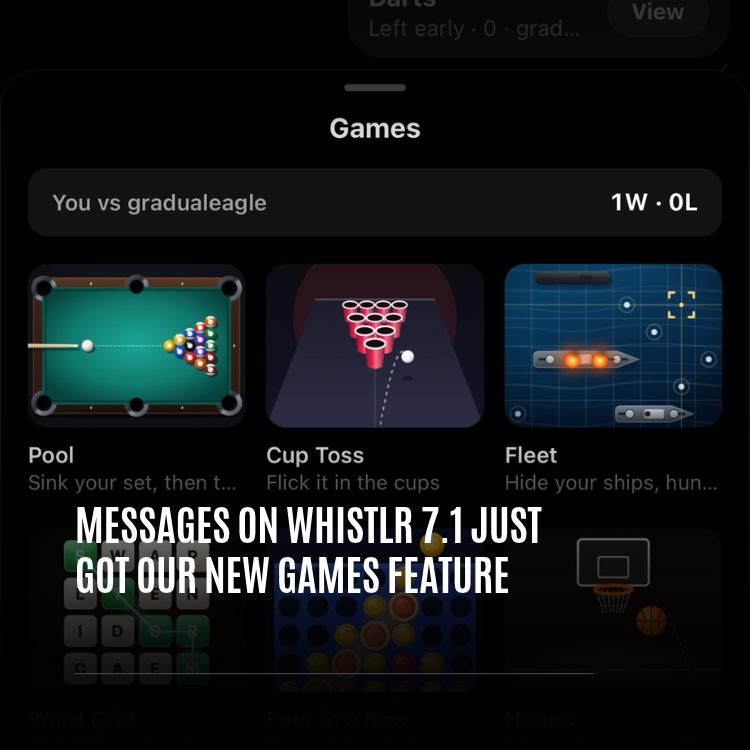
Your chats just got a lot more fun. Whistlr 7.1 brings games you can play with your friends right inside a conversation, from quick one-on-one matches to group games everyone can join. We cover how they work in "Messages on Whistlr 7.1 Just Got Our New Games Feature" here on PX News.
A New Help Center
Help is now easier to find. In Account Center, under More info and support, tap Help Center to open Help and support.
- Search help articles: Type a question and matching articles appear right away.
- Report a problem: Write to the Whistlr team about a bug, a safety concern or anything else.
- Account Status: Review your account status, see if anything you posted was removed and why, and request a review if you think we got it wrong.
- Whistlr Verified: Learn how to get a verified badge, priority support and other benefits.
- Reports and violations: Keep track of your reports and support requests in one place.
- Message support: A button pinned to the bottom of the page, so you can reach a real person whenever you need to.
"The best features are the ones that save you a step. Saving a post into a collection, sending a screenshot to a friend, finding an answer in the Help Center. None of it is flashy, but it all adds up to an app that feels like it's on your side."
— AJ, Founder & CEO, ETAPX
How to Update to Whistlr 7.1
Whistlr 7.1 updates like any other app. It takes about a minute.
On iPhone
- Open the App Store and tap your profile picture.
- Scroll to your updates and find Whistlr.
- Tap Update. Or turn on automatic updates so you always have the newest version.
On Android
- Open Google Play and tap your profile picture.
- Tap Manage apps & device, then Updates available.
- Tap Update next to Whistlr, or turn on auto-update.
Updates Inside the App
Some improvements now arrive right inside Whistlr, without a trip to the store. When one is on its way, you'll see an "Update under way" sheet. Tap Got it to keep browsing, or Show progress to see a small ring that floats above the bottom bar while you scroll. When it's done, an "Update ready" sheet lets you know. Whistlr never restarts on its own, so nothing interrupts you. Close and reopen the app whenever you're ready, and a "What's new" sheet shows you what changed.
Tips for Getting the Most Out of Whistlr 7.1
- Start on the Music tab: Swipe across the top of Home to Music, tap Search, and play something you love. Then keep browsing while it plays.
- Double tap to save songs: On the full player, a double tap on the cover saves the song. Your saves show up in Saved Waves on the Music tab.
- Start your playlist: Tap Library on any song you love, name your playlist, and keep adding from there.
- Get on a leaderboard: Open your favorite artist's channel, tap React, pick a song and post a Mini with it.
- Follow from the video: Tap the + on a creator's photo in Minis to follow them without leaving the clip.
- Find Repost in the heart: Tap the heart on a Mini and Repost is the last option in the reactions tab.
- Make your first collection: Next time you save something, tap the "Saved to bookmarks" message and create a collection for it.
- Screenshot and send: Take a screenshot of something funny and tap the card to send it straight to a friend.
- Add a banner: Open Edit profile, choose Banner, and give your profile a photo or video across the top.
- Know where help is: Help Center lives in Account Center, under More info and support.
"Every update we ship starts with what people tell us. You asked for music back on Home, for a better way to keep the posts you save, and for easier ways to share. Whistlr 7.1 is our answer, and we're already working on what comes next."
— AJ, Founder & CEO, ETAPX
Frequently Asked Questions
What is new in Whistlr 7.1?
Whistlr 7.1 brings the Music tab back to Home next to Highlights, a new music player that grows from a mini player into a full song page, Artist Channels with creator leaderboards, a new look for Minis with a follow + and a Remix button, saved collections, screenshot sharing, a new Haven layout, profile banners, games in Messages and a new Help Center.
Is Whistlr 7.1 available on Android?
Yes. Whistlr 7.1 is available on iPhone and Android, with the same features and the same design on both. Update from the App Store on iPhone or Google Play on Android.
Where is the Music tab on Whistlr?
The Music tab is at the top of Home, after Highlights. Swipe left across the top of Home past Trending, Notes, Live and Highlights, or tap Music to jump straight there.
How do I open the full music player?
Tap the mini player resting above the bottom bar, or swipe it up. The full song page grows out of it. Pull down from the top or tap the grabber to shrink it back.
What is an Artist Channel on Whistlr?
An Artist Channel is an artist's home on Whistlr. It has Play and React buttons, a leaderboard of creators who post with the artist's music, and Songs and Explore tabs with their tracks, albums and playlists.
Where did Repost go on Minis?
Repost is now in the reactions tab. Tap the heart on a Mini and the reactions tab slides out, with Repost as its last option.
How do I make a collection of saved posts?
Save a post, then tap the "Saved to bookmarks" message at the bottom of the screen. In the Save to collection sheet, tap New collection, name it, and the post goes in. Collections are private, and you can manage them from the Saved page.
How do I share a screenshot on Whistlr?
Take a screenshot while you're in Whistlr. A small preview card with a Share button appears for a few seconds. Tap it to open "Share screenshot to," then tap a friend to send it as a message or pick another way to share.
How do I add a banner to my Whistlr profile?
Open Edit profile, choose Banner, and pick a photo or a video. Your banner shows across the top of your profile for you and for anyone who visits.
Whistlr 7.1 is here on iPhone and Android, with music back on Home, a player that goes wherever you go, and new ways to save and share what you love. Update Whistlr today, swipe over to the Music tab, and press play.