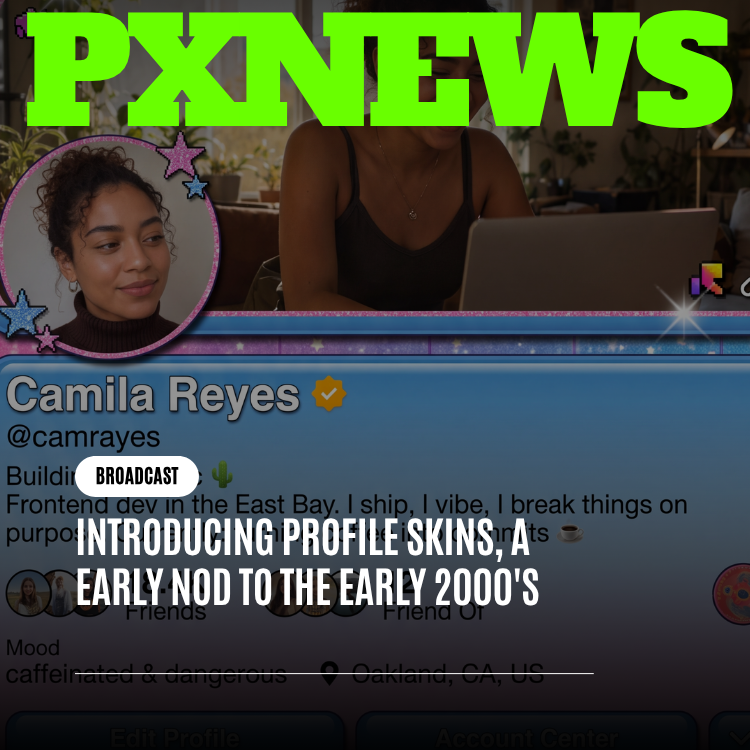
Somewhere between the rise of algorithmic feeds and the flattening of design trends into a handful of safe templates, the internet quietly lost something: the ability to make your own little corner of it look like nobody else's. There was an era — call it the personalization era of the early internet — when a profile page wasn't just a place to post updates, it was a canvas. People spent hours on backgrounds, layouts, colors, widgets, and tiny customizations that had no functional purpose beyond saying "this is me." That instinct never actually went away. It just didn't have anywhere to go. Today, Whistlr is bringing it back with Profile Skins, a new customization feature that lets users apply full visual themes to their profile — tasteful, modernized homages to the personalization era, reimagined for a platform built two and a half decades later. Profile Skins isn't a filter and it isn't a color picker. It's a whole new layer of self-expression sitting on top of everything the profile redesign already introduced, and it's rolling out starting today.
What Profile Skins Actually Are
A Profile Skin is a curated, cohesive visual theme that changes how your Whistlr profile looks and feels without touching what it does. Apply a Skin and your profile's background textures, accent colors, section framing, typography flourishes, and small decorative details all shift together, coordinated by ETAPX's design team rather than assembled piece by piece. Nothing about your actual content changes — your Moods, your Blips, your video banner, your Circuits, your Waves activity, all of it still works exactly the way it always has. What changes is the frame around it: the mood, the palette, the personality of the page itself.
We built Profile Skins to be additive rather than disruptive. A profile with no Skin applied looks and behaves exactly as it does today — clean, modern, built around the living-snapshot philosophy of the recent redesign. Apply a Skin, and that same structure gets a new visual coat, one that leans into warmth, texture, and a kind of unpolished charm that most modern app design has sanded away. It's less about recreating anything specific from internet history and more about capturing a feeling: the sense that a profile page used to be something you decorated, not just something you filled out.
Every Skin in the launch collection was designed as a complete set rather than a grab bag of mix-and-match pieces. That was a deliberate choice. Letting people combine backgrounds from one theme with fonts from another sounds appealing on paper, but in practice it tends to produce visual noise rather than personality. Instead, each Skin is its own fully realized look — pick one, apply it, and every element updates together so the result always feels intentional, even if you spend thirty seconds choosing it and never think about it again.
"Profile personalization used to be one of the most human parts of being online. You'd spend an evening picking colors and backgrounds for a page that maybe a few dozen people would ever see, and it didn't matter, because the point was never the audience — it was the act of making something yours. Somewhere along the way, the industry decided that was inefficient. Everything got standardized, templated, optimized into sameness. Profile Skins is us saying that instinct was never wrong, it just needed a modern home."
— AJ, Founder & CEO, ETAPX
Why We Built This: Nostalgia Is a Feature, Not a Bug
It would be easy to write Profile Skins off as a nostalgia play, and honestly, we won't pretend nostalgia isn't part of it. But the deeper motivation is about something the entire industry drifted away from over the last decade and a half: the idea that a profile is a place you make, not just a place you fill in. For a long stretch of internet history, personalizing your page was a core, expected part of being online — picking colors, arranging modules, adding little widgets and flourishes that served no purpose other than expressing who you were. Then platforms consolidated around clean, uniform templates, largely for good reasons — consistency, accessibility, faster load times, easier moderation — and something real got lost in the trade. Every profile on every major platform started looking like a slightly different arrangement of the same boxes. We think there's room to have both. Whistlr's profile redesign already made the page feel alive through Moods, Blips, and video banners — the content layer of who you are right now. Profile Skins adds the layer underneath that: the aesthetic layer, the part that's less about what you're saying and more about how your space feels to be in. It's the difference between the words on a postcard and the postcard itself.
There's also a simpler, more practical reason. Self-expression tools tend to be some of the most quietly beloved features on any platform, precisely because they don't ask anything of anyone else. A new Skin doesn't affect your followers, doesn't change how your content performs, doesn't require anyone to learn anything new to understand your profile. It's a form of expression that costs nothing and demands nothing back, which is a rare and valuable thing in a product ecosystem where most features are built around interaction, growth, or engagement metrics. Profile Skins exists purely because it makes Whistlr a little more fun to have, and a little more yours.
"When we started scoping this, the design brief was almost embarrassingly simple: make people feel the way they felt the first time they got to pick a background for their own page. That's it. That's the whole brief. Everything else — the coordination system, the way Skins interact with Halo and Moods, the launch collection — all of it exists in service of that one feeling."
— Renata Osei, VP of Product, ETAPX
How to Pick and Apply a Skin
Applying a Profile Skin takes about as long as it takes to read this sentence. From your profile, a new "Skins" entry sits alongside your existing customization options, opening a gallery view of every available theme rendered as a live preview against your actual profile content — not a generic mockup, but your Moods, your banner, your layout, shown exactly as they'd look under that Skin. Tap one and it previews instantly; tap Apply and it's live. Changing your mind costs nothing. You can swap Skins as often as you like, revert to the default clean look at any time, or leave one in place indefinitely. There's no cooldown, no limit, and no cost to browsing.
Skins apply at the profile level, which means visitors to your profile see your chosen theme the moment they land on your page, while your presence everywhere else on Whistlr — the feed, chats, Circuits — stays visually consistent with the rest of the platform. That was an intentional boundary. Personalization should feel expansive on your own space and invisible everywhere else, so scrolling through a feed full of different people's Skins never turns into visual chaos. Your profile is the canvas. The rest of Whistlr stays the shared, coherent space it's always been.
Every Skin is fully free at launch and available to every user regardless of account tier. We talked seriously about whether some Skins should be exclusive or unlockable through milestones, and ultimately decided the entire point of this feature — universal, low-friction self-expression — would be undercut by putting a gate in front of any of it. If we introduce anything unlockable down the line, it'll be additional, not a paywall on what's already here.
The Launch Skin Collection
The launch collection ships with six Skins, each built as a distinct, complete aesthetic rather than a single texture swap. The design team spent months studying the general visual language of the internet's early personalization era — its colors, its textures, its willingness to be a little chaotic and a lot sincere — and distilled that into looks that feel current on a modern profile rather than like a costume. None of these are meant to be a literal replica of anything specific; they're original designs that borrow a feeling more than a formula.
- Static Bloom: A soft-focus floral and gradient theme built around pastel washes and a gentle shimmer effect on section dividers, evoking the era's love of decorative, glittery flourishes without any of the visual clutter that phrase might bring to mind.
- Dial-Up Diner: A warm, retro-diner palette of cream, chrome, and cherry-red accents with a playful, rounded typographic treatment — nostalgic in tone, not in literal iconography.
- Guestbook Green: A cozy, forum-inspired theme built around deep greens and warm parchment tones, designed to evoke the feeling of a page meant to be visited and left a note on, reinterpreted as clean modern framing rather than a literal message board.
- Neon Bulletin: A high-contrast dark theme with electric cyan and magenta accents and subtle scanline texturing, channeling the loud, confident energy of early web graphic design without ever compromising legibility.
- Mixtape Static: A moody, cassette-inspired theme in muted purples and warm grain textures, built with an obvious wink toward the era's obsession with curated playlists and pairs especially well with an active Waves presence on your profile.
- Frosted Cursor: A crisp, icy blue-and-white theme with soft drop-shadow detailing and a subtle sparkle accent on interactive elements, capturing the era's fondness for glossy, slightly over-decorated interface flourishes in a restrained modern form.
Each Skin was built with accessibility in mind from the start — contrast ratios, font legibility, and touch target sizing were all tested against the same standards as the rest of Whistlr, so a fun, decorative theme never comes at the cost of a profile that's actually easy to read and navigate. Nostalgic doesn't mean compromised, and every Skin in the launch set had to clear that bar before it shipped.
Naming each Skin turned out to be its own small design project. The team wanted names that felt evocative of a general era rather than tied to anything specific, so a lot of early candidates got cut for being too on-the-nose. What survived is a collection of names meant to spark a feeling on their own, before a person even sees the theme attached to them — the kind of names that could plausibly have belonged to a dozen different corners of the old personalization-heavy web rather than any one of them in particular. That distinction mattered more than it might sound like it should, because the whole point of this collection is to feel like a warm, familiar memory rather than a specific, licensed reference.
How Profile Skins Works With Halo, Moods, Blips, and Video Banners
Profile Skins was designed from day one to sit underneath the rest of the profile experience rather than compete with it, and that took real design discipline. The recent profile redesign turned the page into a living snapshot built around Moods, Blips, and video banners — content that updates constantly and needs to stay front and center no matter what background it's sitting on. So every Skin was built with those elements treated as fixed, protected space. Your video banner still plays exactly as it always has. Your current Mood still displays clearly. Your Blips still read exactly as intended. A Skin changes the frame around all of that; it never competes with it for attention. Halo gets the same treatment. Because Halo's whole design philosophy is built around restraint — a soft, low-opacity glow that's meant to be noticed rather than demanded — every launch Skin was specifically tuned so Halo's ring colors and pulse states remain clearly visible and unambiguous no matter which theme is active underneath them. A Live Pulse Halo needs to read as a Live Pulse Halo whether your profile is running Neon Bulletin or Frosted Cursor, and our design team treated that consistency as a hard requirement rather than a nice-to-have.
The result is a profile that can feel dramatically different at a glance — a completely different color story, a different texture, a different personality — while every functional and informational layer underneath stays exactly as legible and consistent as it's always been. You get to redecorate the house without moving any of the furniture.
Community Reaction
We shared a preview of Profile Skins with a small group of active creators and longtime users ahead of today's wider rollout, and the reaction was some of the most immediately enthusiastic feedback we've gotten on any recent feature. There's something about profile customization that seems to hit differently than most feature announcements — people didn't just say they liked it, they immediately started talking about which Skin they'd pick and why, the same way you'd talk about redecorating a room rather than trying a new app setting.
"I genuinely gasped when I saw Guestbook Green. I didn't even know I missed having a profile that felt like a little handmade space until I saw one option that looked like that again. My profile has basically looked the same as everyone else's for years and now it doesn't, and that shouldn't feel like as big a deal as it does, but it really does."
— Whistlr user, active in five Circuits
"Mixtape Static paired with my Waves activity on my profile is exactly the vibe I didn't know I wanted. It's giving old internet bedroom energy in the best way, but it still looks like a real, current app and not like it's trying too hard to be retro. Whoever picked that color grain deserves a raise."
— Whistlr user, Waves playlist curator
"Honestly the thing that got me wasn't even the look of it, it was how fast I could change my mind. I tried three Skins in under a minute before landing on Dial-Up Diner. No commitment, no 'are you sure,' just pick and go. That's exactly how a feature like this should feel."
— Whistlr user, early access tester
A few testers also flagged, unprompted, how much they appreciated that Skins didn't slow anything down or make their profile harder to use — a small but telling sign that the accessibility and legibility work behind the scenes landed the way it was meant to. Several people also asked, almost immediately, whether more Skins were coming, which the design team is taking as validation that this collection is a starting point rather than a one-time event.
What's Next for Profile Skins
Six Skins is a launch collection, not a ceiling. The design team is already exploring additional themes for future releases, and we're paying close attention to which of the launch six resonate most strongly so future additions build on what people actually gravitate toward rather than guesses made in a vacuum. We're also looking at whether seasonal or limited-run Skins make sense down the line — a way to keep the collection feeling alive without ever making the core, always-available set feel incomplete or held back on purpose. One thing that isn't on the table: turning Skins into a competitive or comparative feature. This was built purely as a form of self-expression, and we intend to keep it that way. No leaderboards for who has the "best" Skin, no algorithmic promotion of certain themes over others, no social pressure baked into the design. Just a set of looks people can choose because they like them, exactly the same spirit that made profile personalization special the first time around.
Frequently Asked Questions
Do Profile Skins cost anything?
No. All six launch Skins are completely free and available to every Whistlr user regardless of account tier. There's no premium unlock required to browse, preview, or apply any of them.
Can I change my Skin as often as I want?
Yes. There's no limit on how often you can switch Skins, no cooldown period, and no penalty for changing your mind. You can preview a Skin against your actual profile before applying it, and revert to the default look at any time.
Will a Skin change how my Moods, Blips, or video banner display?
No. Skins change the visual frame around your profile — backgrounds, accent colors, textures, and decorative details — but every Skin was specifically designed to keep your Moods, Blips, and video banner displaying exactly as clearly and consistently as they do without a Skin applied.
Does applying a Skin affect how Halo looks on my profile?
No. Every launch Skin was tuned so that Halo's ring colors and pulse states stay clearly readable no matter which theme is active. Halo will always look and behave the same functionally; only the background it sits against changes.
Are more Skins coming after this initial collection?
Yes, this is intended as a starting collection rather than a final one. The design team is already working on additional themes, and future additions will be informed by which of the launch Skins users respond to most.
Profile Skins is live starting today for every Whistlr user, all six themes, no cost, no catch. It's a small feature in the sense that it doesn't change what you can do on Whistlr — but it's a meaningful one in the sense that it hands a piece of the old internet's best habit back to people: the simple, slightly indulgent joy of making your own page feel like yours.